Lulla TeamWe review current pediatric literature and synthesise it into accessible language for parents. All recommendations follow WHO and AAP guidelines.
How to share sleep tracking with your partner
Your baby's sleep is a team responsibility. With Lulla, both parents can view and add data — live, from different phones.
Step by step
Parent A (who already has an account):
- Open Lulla → Settings → Sharing
- Tap "Generate invite code"
- Copy the 6-character code and send it to your partner
Parent B (installing Lulla):
- Install Lulla and create an account
- At the "How many children are you tracking?" step — enter the code you received
- Done! The babies and all the data appear automatically
What gets shared
- Baby profiles (name, age, nicknames)
- All sleep sessions — full history
- Statistics and the sleep score
- New sessions added by either parent — live
Why it matters
When both parents track sleep, responsibility is shared naturally. "I put him down at 7:15pm last night, can you take tonight?" — with concrete data, not guesswork.
Your baby's sleep schedule, by age
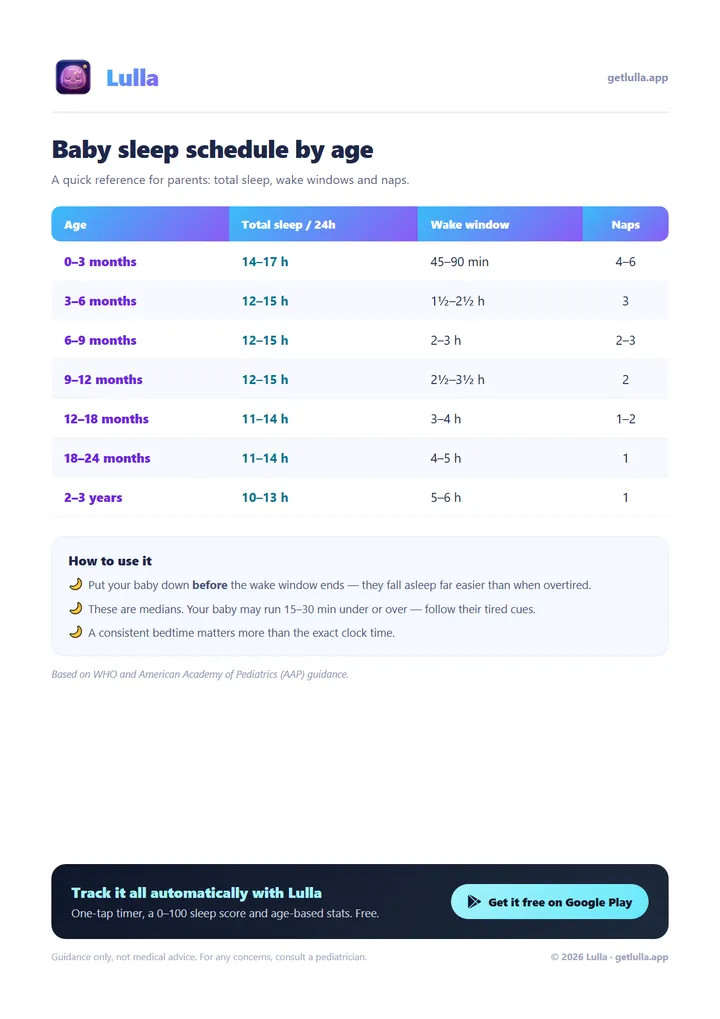
Your baby's sleep schedule, by age
One chart with everything that matters: total sleep per 24h, wake windows and number of naps, from newborn to age 3. Based on WHO and AAP guidance.
Sources and references
This article draws on official guidelines and peer-reviewed studies. Verify the sources directly:
- Mindell JA, Telofski LS, Wiegand B, Kurtz ES (2009). A nightly bedtime routine: Impact on sleep in young children and maternal mood. Sleep, 32(5), 599–606.
- American Academy of Pediatrics — Sharing Parenting Responsibilities (HealthyChildren.org)
- National Sleep Foundation — Parental Sleep and Wellbeing
📖 Read also:
- How to build the perfect sleep routine for your baby
- What the sleep score means and how to improve it
- How many hours should your baby sleep? Age-by-age guide
Or check out the complete baby sleep guide — all 7 articles condensed in one place.